AirPods and the Apple Unified Log. Part 1. Introduction and methodology
Investigating the Apple Unified Logging to find artefacts of connected Airpods. Part 1
The Apple Unified Log (AUL) records a large amount of diagnostic and operational information generated by iOS and its services. While using my AirPods I got curious which artefacts are recorded in the AUL during the use of AirPods with an iPhone.
To find out I used an iPhone 12 paired with AirPods Pro. The Apple Unified Log (AUL) was collected after the activity and analyzed to determine which user interactions can be reconstructed from the logging based on the artefacts.
This post is the first in a serie that examines which AirPods related artefacts are recorded in the Apple Unified Log. Each subsequent post focuses on one specific user interaction.
Research question
What artifacts can be found in the Apple Unified Logs of during the use of AirPods paired with an iPhone?
Test methodology
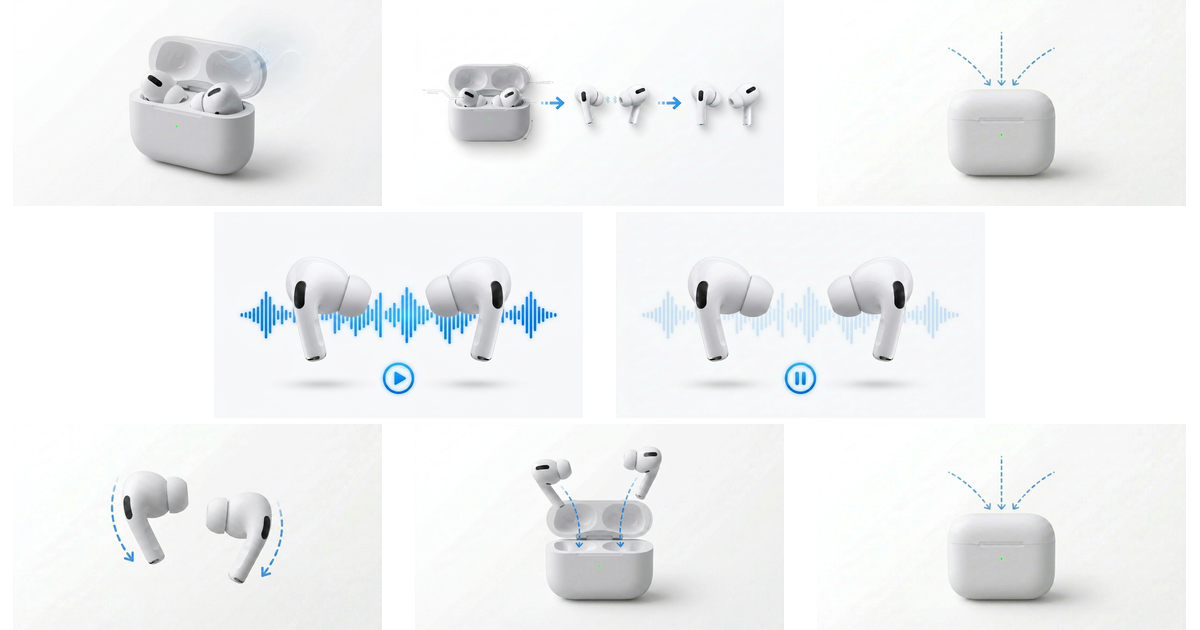
To generate the logging I performed the following actions using a AirPods Pro with firmware 6F21 and a paired iPhone 12 using iOS 26.5.
- Open the Charging Case.
- Remove both AirPods and place them in the ears.
- Close the Charging Case.
- Start music playback using the right AirPod.
- Pause playback using the left AirPod.
- Remove both AirPods.
- Return both AirPods to the Charging Case.
- Close the Charging Case.
These actions where performed in a 5 minute timewindow.
The Apple Unified Log was collected using filtering for the times of these actions.
1
2
3
# log collect --device iphone12 --start "2026-06-29 16:19:00" --output iphone12_2906.logarchive

# log show --archive iphone12_2906.logarchive --start "2026-06-29 16:19:00" --end "2026-06-29 16:19:30" --info --debug > iphone12_2906.log
Timeline
Using the AUL, the following timeline could be constructed:
| Time | User action | Observable Apple Unified Log artefacts | Blog part |
|---|---|---|---|
| 16:19:01.591 | Charging Case opened | AirPods detected through Bluetooth advertisement. Pairing information published. ANC mode logged as Transparency. Lid reported open (lid closed: no). | Part 2 |
| 16:19:01.602 | Charging Case opened | Case battery information published. | Part 2 |
| 16:19:01.603 to 16:19:01.734 | AirPods in case | Battery information for right AirPod followed by combined left and right batteries becomes available. | Part 2 |
| 16:19:02.156 | AirPods removed from case | nearbyInCase changes from yes to no. | Part 3 |
| 16:19:03.326 | Right AirPod outside ear | Right AirPod transitions from Unknown to OutOfEar. Secondary AirPod still Unknown. | Part 3 |
| 16:19:03.930 | Left AirPod outside ear | Left AirPod transitions from Unknown to OutOfEar. Both AirPods now OutOfEar. | Part 3 |
| 16:19:04.220 | Right AirPod inserted | Primary bud changes to InEar while secondary remains OutOfEar. | Part 3 |
| 16:19:04.474 | Left AirPod inserted | Both AirPods become InEar. State changes from SingleBud to BothBuds. | Part 3 |
| 16:19:05.062 | Audio connection established | Find My reports both AirPods connected without playing sound. | Part 3 |
| 16:19:06.688 | Play command | AVRCP Play command received. Logged as cmd Play. No indication which AirPod generated the command. | Part 5 |
| 16:19:06.835 to 16:19:07.033 | Audio streaming begins | A2DP streaming initiated. | Part 5 |
| 16:19:07.047 | Active listening | Bluetooth advertisement reports audio state A2DP. ANC Transparency remains active. | Part 5 |
| 16:19:13.257 | Pause command | AVRCP Pause command received. Logged as cmd Pause. No indication which AirPod generated the command. | Part 6 |
| 16:19:16.349 | Right AirPod removed from ear | Primary bud changes to OutOfEar. Usage summary changes from BothBuds to SingleBud. | Part 7 |
| 16:19:16.416 | Left AirPod removed from ear | Secondary bud changes to OutOfEar. Usage summary becomes Invalid because neither AirPod is in ear. | Part 7 |
| 16:19:16.653 | Open Charging Case | Case recorded as Power source | Part 8 |
| 16:19:17.562 | Right AirPod returned to Charging Case | Primary bud changes from OutOfEar to InCase. | Part 8 |
| 16:19:17.672 | Left AirPod returned to Charging Case | Secondary bud changes from OutOfEar to InCase. | Part 8 |
| 16:19:18.791 | Both AirPods inside Charging Case | nearbyInCase changes to yes. nearbyLidClosed changes to yes. | Part 8 |
| 16:19:18.790 | Charging Case closed | Bluetooth advertisement reports lidClosed yes, primaryInCase yes, secondaryInCase yes. | Part 9 |
Overview of the articles
- Part 1. Introduction and methodology
- Part 2. Opening the Charging Case
- Part 3. Detecting AirPods removed and inserted into the ear
- Part 4. Closing the Charging Case
- Part 5. Media play event
- Part 6. Media pause events
- Part 7. Detecting AirPods removed from the ears
- Part 8. Detecting AirPods returned to the Charging Case
- Part 9. Closing the Charging Case
- Part 10. Conclusion